GOTV mode has been designed to allow you to use the same session multiple times for multiple knocks by filtering out properties and voters that you have already spoken to or have identified as not needing to be turned out.
The filtering is applied after you have ended and then restarted a road group or whole session by clicking the 'stop' button and then 'play' button. For more guidance on stopping and starting sessions, see Starting and Ending Sessions in Labour One.
Properties or individuals that meet the filtering criteria will he hidden in your session so that only the properties and voters that you still need to speak to will be shown. This will be the case across the whole session and for any team members who join or rejoin the session.
If the property has only one voter in it, the whole property will be hidden if that voter is filtered and hidden from list and map view. If the property has more than one voter in it and not all voters in the property have met the filtering criteria, only the voters who meet the criteria will be hidden and the remaining voters will remain so the property will still be visible on list and map view.
What won't be hidden from the session?
Not In - properties or individuals that have been marked as Not In will remain in the session and the status 'Not In' will be cleared.
Language Difference - individuals that have been marked as Language Difference for the reason that you were unable to contact them will remain in the session and the status 'Language Difference' will be cleared.
Labour and Undecided Voter ID who have not yet voted - individuals that have given a Labour or Undecided answer to the local/current voting intention question will remain in the session and the 'completed' status will be cleared. This is the case even if other data has been entered, unless that data meets the GOTV filtering criteria.
Has not voted - individuals that have answered 'no' to the question 'have you voted?' will remain in the session and the 'completed' status will be cleared. This is the case even if other data has been entered, unless that data meets the GOTV filtering criteria.
Return after time who have not yet voted - individuals who have given an answer to the 'what time will you vote' question and have not given any other answer that meets the GOTV filtering criteria will remain in the session. If other data was given and a 'complete' status applied, this will be cleared and the time to return after will remain against the property and individual until that individual has been filtered from the session (hopefully because they have answered 'yes I have voted and I voted for Labour'!)
What will be hidden from the session?
Filtering applies to the most recently entered data, so for example if you enter a survey with the answer to 'have you voted yet' as no by mistake and do the survey again with the answer as 'yes', the most recent answer is 'yes' so when the road group has been ended and then restarted, that voter will be filtered out and hidden in the session.
Against VID - individuals who have given an answer to the local/current voting intention question which is not Labour or Undecided will be filtered and hidden from the session.
Has already voted - any individuals who answer 'yes' to the question 'have you voted?' will be filtered and hidden from the session.
More Options (Property) - properties marked as Inaccessible, No Canvassers, Do Not Return and Do Not Return (This Election Only) via the 'more options' menu in the property preview will be filtered and hidden from the session.
Unable to Record Data (Individual) - individuals marked as Deceased, Moved, Do Not Return and Do Not Return (This Election Only) entered in the 'Unable to Record Data' menu at the top of the voter survey will be filtered and hidden from the session.
Please note that marking a whole property as 'Do Not Return' will add a flag in Contact Creator which prevents that property from being included in all future sessions. Marking a property as 'Do Not Return (This Election Only)' filters then from the current GOTV session but will not prevent the property from being included in other session created via Contact Creator. If just one person from a multi-person property has indicated that they do not want to be contacted by Labour again but there are others in the property who have not, please use the individual option in the Unable to Record Data menu at the top of the voter survey. See here for more guidance: Unable to Contact
GOTV Filtering Quick Overview
| Filter Reason | What Gets Hidden | Details |
|---|---|---|
| Against VID | Individual voter | Anyone whose local/current voting intention is not Labour or Undecided |
| Has Already Voted | Individual voter | Anyone who answered "Yes" to "Have you voted?" |
| Unable to Contact (Property) | Entire property | Properties marked as: Inaccessible, No Canvassers, Do Not Return, or Do Not Return (This Election Only) |
| Unable to Contact (Individual) | Individual voter | Individuals marked as: Deceased, Moved, Do Not Return, or Do Not Return (This Election Only) |
Contacted via Dialogue or Telling
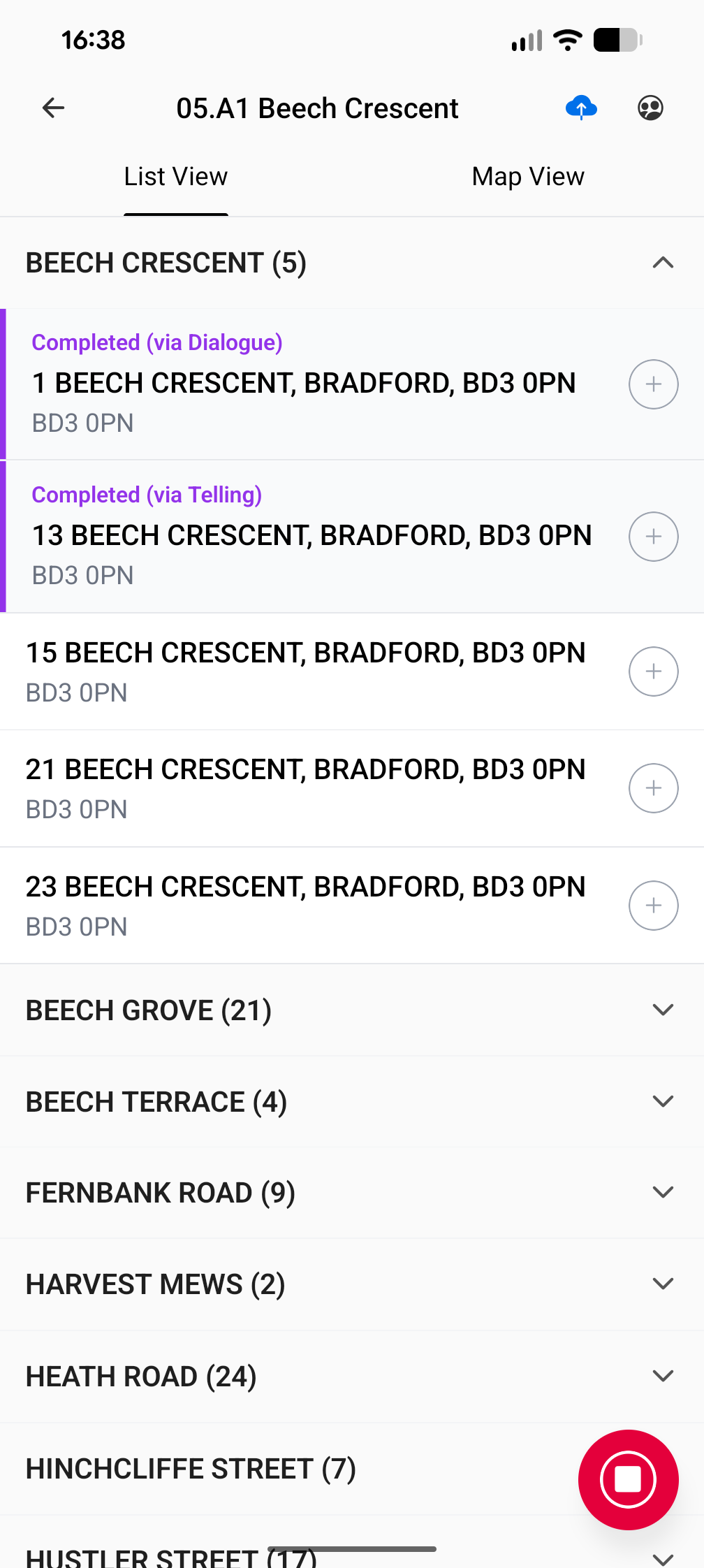
If a voter has confirmed that they have already voted by Dialogue or Telling, a 'completed' status will show on the Labour One app with the source indicated.
Telling contacts will only show when the Teller used the Telling app to enter the data. For guidance on the Telling app, please see Telling App How-To.
When a contact was made via Dialogue, the status will show as 'Completed (via Dialogue)' When a contact was made via Telling, the status will show as 'Completed (via Telling)'.
The voter and property will still show in Labour One and you can still open the survey and enter further data, however as the voter has confirmed that they have voted already through a different method of contact you don't necessarily need to speak to that voter again.
See how GOTV filtering works in a flowchart here: GOTV Mode Filtering Flowchart